> ## Documentation Index
> Fetch the complete documentation index at: https://docs.usenash.com/llms.txt
> Use this file to discover all available pages before exploring further.
# Workflows
> Nash workflows are an automation engine that responds to delivery events with filters and actions — applying dispatch strategies, modifying orders, sending notifications, and more.
A **workflow** is an automation that responds to an event in Nash and runs a series of actions. Workflows let you encode operational logic — "when an order is created, if it's high value, apply the white-glove dispatch strategy and notify the team" — so the platform handles decisioning instead of your application.
Workflows are how Nash determines which [dispatch strategy](/reference/dispatch-strategies) an order flows into, and how it automates order-level decisions using attributes like order value, product type, destination, SLA, or merchant-defined metadata.
 ## What workflows are
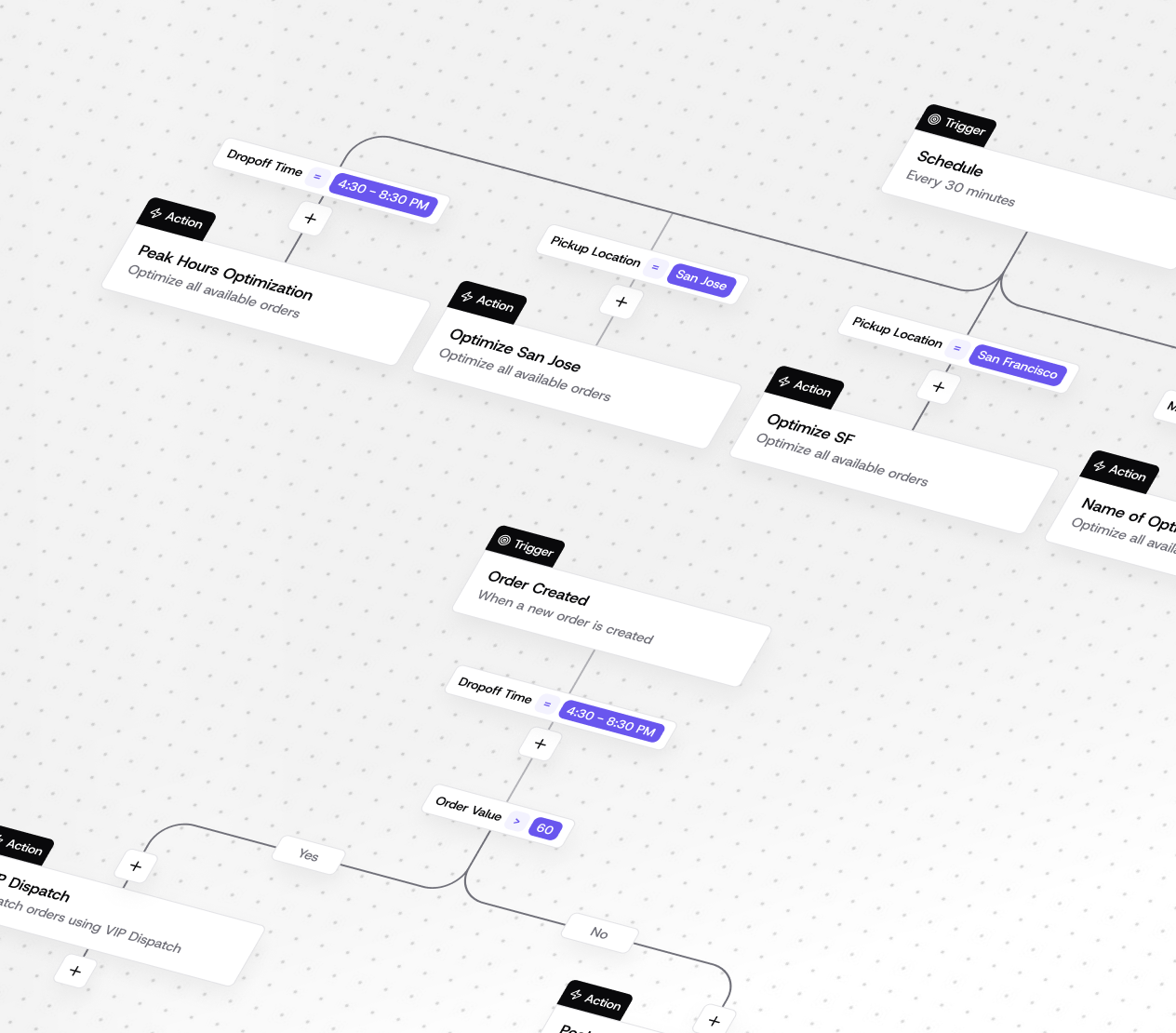
A workflow is built from **nodes** connected by **edges**, plus a **trigger** that defines when it runs.
* **Nodes** are the steps of the workflow. Each node has a type:
* `trigger` — the entry point that starts the workflow
* `filter` — evaluates conditions and branches the flow
* `action` — performs an operation
* `switch` — routes execution based on a value
* **Edges** connect nodes and define execution order. An edge type of `default` is used for trigger and action nodes. For filter nodes, `success` follows when the condition is met and `negative` follows when it is not.
* **A trigger** defines the event that activates the workflow.
A workflow moves through a lifecycle of statuses: `draft`, `active`, `inactive`, `archived`, and `template`. New workflows are created in `draft` by default and must be set to `active` to run. Updating a workflow's structure (nodes, edges, and trigger together) creates a new version.
### Actions
Action nodes perform operations on the order or delivery, or send notifications. Supported actions include:
* Apply a **dispatch strategy** or an **optimization strategy**
* **Modify order price or tip**
* **Add a tag** or **extract a metadata field**
* **Flag a delivery**, **auto-reassign**, **cancel a delivery**, **cancel an order**, or **remove an order from a route**
* **Add requirements** to an order
* Send a notification by **email**, **SMS**, **Slack**, or **Teams channel message**
* **Summarize**, run an **agent call** or **browser automation**, or **emit a custom event**
The exact set of actions, their configuration schemas, and the available filter fields and operators are self-describing. Call `GET /v1/workflows/schema` to retrieve the current triggers, action config schemas, filter fields and operators, and supported node, edge, and status types.
## Triggers & conditions
A workflow's **trigger** specifies what activates it. Trigger types include `event`, `manual`, `webhook`, and `cron`. Event triggers listen for a named event in Nash — for example `order.created` or `order.creating`. (Currently, the REST API for creating workflows supports the `event` trigger type; other trigger types exist in the platform but are not all exposed through that endpoint.)
**Conditions** are expressed with **filter nodes**. Each filter holds one or more conditions made up of a `field`, an `operator`, and a `value`. When the filter evaluates true, execution follows the `success` edge; otherwise it follows the `negative` edge — letting you branch a workflow based on order attributes. The available fields and operators are returned by `GET /v1/workflows/schema`.
You can also start an active workflow on demand with the Trigger Workflow endpoint (`POST /v1/workflows/{id}/trigger`), passing entity references (such as the ID of a job, i.e. a delivery) and optional input data, in synchronous or asynchronous mode.
## How workflows relate to dispatch strategies
Workflows and dispatch strategies are complementary:
* A **dispatch strategy** answers *"given this job, which provider should fulfill it?"* — it defines the eligible providers, selection rule, and failover behavior.
* A **workflow** answers *"given this event and these conditions, what should happen?"* — including *which dispatch strategy to apply*.
A common pattern is a workflow triggered on order creation, with filter nodes that branch on order value or destination, and `dispatch_strategy` action nodes that apply the right strategy to each branch. This is the same role served by [Automations](/api-reference/dispatch-strategies/dispatch-automations), which map account-level business rules to dispatch strategies; workflows generalize that idea to a broader set of triggers, conditions, and actions.
## Next steps
How Nash selects a provider for each delivery.
Map business rules to dispatch strategies.
Configure delivery notifications to customers and systems.
See where workflows fit in the delivery lifecycle.
## What workflows are
A workflow is built from **nodes** connected by **edges**, plus a **trigger** that defines when it runs.
* **Nodes** are the steps of the workflow. Each node has a type:
* `trigger` — the entry point that starts the workflow
* `filter` — evaluates conditions and branches the flow
* `action` — performs an operation
* `switch` — routes execution based on a value
* **Edges** connect nodes and define execution order. An edge type of `default` is used for trigger and action nodes. For filter nodes, `success` follows when the condition is met and `negative` follows when it is not.
* **A trigger** defines the event that activates the workflow.
A workflow moves through a lifecycle of statuses: `draft`, `active`, `inactive`, `archived`, and `template`. New workflows are created in `draft` by default and must be set to `active` to run. Updating a workflow's structure (nodes, edges, and trigger together) creates a new version.
### Actions
Action nodes perform operations on the order or delivery, or send notifications. Supported actions include:
* Apply a **dispatch strategy** or an **optimization strategy**
* **Modify order price or tip**
* **Add a tag** or **extract a metadata field**
* **Flag a delivery**, **auto-reassign**, **cancel a delivery**, **cancel an order**, or **remove an order from a route**
* **Add requirements** to an order
* Send a notification by **email**, **SMS**, **Slack**, or **Teams channel message**
* **Summarize**, run an **agent call** or **browser automation**, or **emit a custom event**
The exact set of actions, their configuration schemas, and the available filter fields and operators are self-describing. Call `GET /v1/workflows/schema` to retrieve the current triggers, action config schemas, filter fields and operators, and supported node, edge, and status types.
## Triggers & conditions
A workflow's **trigger** specifies what activates it. Trigger types include `event`, `manual`, `webhook`, and `cron`. Event triggers listen for a named event in Nash — for example `order.created` or `order.creating`. (Currently, the REST API for creating workflows supports the `event` trigger type; other trigger types exist in the platform but are not all exposed through that endpoint.)
**Conditions** are expressed with **filter nodes**. Each filter holds one or more conditions made up of a `field`, an `operator`, and a `value`. When the filter evaluates true, execution follows the `success` edge; otherwise it follows the `negative` edge — letting you branch a workflow based on order attributes. The available fields and operators are returned by `GET /v1/workflows/schema`.
You can also start an active workflow on demand with the Trigger Workflow endpoint (`POST /v1/workflows/{id}/trigger`), passing entity references (such as the ID of a job, i.e. a delivery) and optional input data, in synchronous or asynchronous mode.
## How workflows relate to dispatch strategies
Workflows and dispatch strategies are complementary:
* A **dispatch strategy** answers *"given this job, which provider should fulfill it?"* — it defines the eligible providers, selection rule, and failover behavior.
* A **workflow** answers *"given this event and these conditions, what should happen?"* — including *which dispatch strategy to apply*.
A common pattern is a workflow triggered on order creation, with filter nodes that branch on order value or destination, and `dispatch_strategy` action nodes that apply the right strategy to each branch. This is the same role served by [Automations](/api-reference/dispatch-strategies/dispatch-automations), which map account-level business rules to dispatch strategies; workflows generalize that idea to a broader set of triggers, conditions, and actions.
## Next steps
How Nash selects a provider for each delivery.
Map business rules to dispatch strategies.
Configure delivery notifications to customers and systems.
See where workflows fit in the delivery lifecycle.