> ## Documentation Index
> Fetch the complete documentation index at: https://docs.usenash.com/llms.txt
> Use this file to discover all available pages before exploring further.

# How Nash works

> An end-to-end overview of the Nash delivery orchestration platform — the delivery lifecycle, the provider network, and the core building blocks you integrate with.

Nash is a delivery orchestration platform that lets your business offer reliable delivery through a single integration. Nash connects you to a large network of fleet providers and drivers, and gives you the tools to create, dispatch, track, and recover deliveries — through the Nash Portal and programmatically through the Nash API.

This page is the canonical overview of how the platform fits together. If you want to start building, jump to the [API overview](/api-reference/api-overview).

<img src="https://mintcdn.com/nashtechnologies/RFBLfoXweHrotTxu/images/concepts/nash-graphic-1.svg?fit=max&auto=format&n=RFBLfoXweHrotTxu&q=85&s=e0972557b583e0b53c89093dbd46c999" alt="Nash Introduction" width="522" height="468" data-path="images/concepts/nash-graphic-1.svg" />

## The delivery lifecycle

Every delivery follows a clear, observable lifecycle. There are three logical phases: **Order Ingestion**, **Dispatch**, and **Tracking**.
<div className="nash-lifecycle">
  <div className="row">
    <div className="nash-life-stage">
      <div className="dot">
        <svg viewBox="0 0 24 24" fill="none" stroke="currentColor" strokeWidth="1.7" strokeLinecap="square" strokeLinejoin="miter">
          <path d="M3.5 7.6 12 3.5l8.5 4.1v8.8L12 20.5l-8.5-4.1z" />

          <path d="M3.5 7.6 12 11.6l8.5-4M12 11.6v8.9" />
        </svg>
      </div>

      <div className="name">Create</div>
      <div className="desc">An order arrives with a pickup and a dropoff</div>
    </div>

    <div className="nash-life-stage">
      <div className="dot">
        <svg viewBox="0 0 24 24" fill="none" stroke="currentColor" strokeWidth="1.7" strokeLinecap="square" strokeLinejoin="miter">
          <path d="m12 3.2 8.8 4.4L12 12 3.2 7.6z" />

          <path d="m5.2 11.6-2 1 8.8 4.4 8.8-4.4-2-1" />

          <path d="m5.2 15.6-2 1 8.8 4.4 8.8-4.4-2-1" />
        </svg>
      </div>

      <div className="name">Quote</div>
      <div className="desc">Eligible providers and your fleet return priced quotes</div>
    </div>

    <div className="nash-life-stage" data-signal="true">
      <div className="dot">
        <svg viewBox="0 0 24 24" fill="none" stroke="currentColor" strokeWidth="1.7" strokeLinecap="square" strokeLinejoin="miter">
          <path d="M13.2 3 4.8 13.4h5.6l-.9 7.6 8.7-10.4h-5.8z" />
        </svg>
      </div>

      <div className="name">Dispatch</div>
      <div className="desc">Your strategy — or you — picks the provider</div>
    </div>

    <div className="nash-life-stage">
      <div className="dot">
        <svg viewBox="0 0 24 24" fill="none" stroke="currentColor" strokeWidth="1.7" strokeLinecap="square" strokeLinejoin="miter">
          <path d="M2.5 12S6 5.6 12 5.6 21.5 12 21.5 12 18 18.4 12 18.4 2.5 12 2.5 12z" />

          <path d="M9 12a3 3 0 1 0 6 0 3 3 0 1 0-6 0" />
        </svg>
      </div>

      <div className="name">Track</div>
      <div className="desc">Webhooks, the Portal, and live tracking, end to end</div>
    </div>

    <div className="nash-life-stage">
      <div className="dot">
        <svg viewBox="0 0 24 24" fill="none" stroke="currentColor" strokeWidth="1.7" strokeLinecap="square" strokeLinejoin="miter">
          <path d="M20 12a8 8 0 1 1-2.4-5.7" />

          <path d="M20.5 3.5v4.3h-4.3" />
        </svg>
      </div>

      <div className="name">Recover</div>
      <div className="desc">Failover re-quotes and reassigns if a provider falls through</div>
    </div>
  </div>

  <div className="legend">
    <span className="li"><span className="sw" style={{ background: "var(--nash-accent)" }} /> The moment Nash acts</span>
    <span className="li"><span className="sw" style={{ background: "var(--nash-fg-faint)" }} /> The loop runs on every delivery</span>
  </div>
</div>

### Order Ingestion

The starting point for Nash is information about a potential delivery. You submit pickup and dropoff details, package information, and timing requirements. This can come through the REST API, the GraphQL API, a CSV upload in the Portal, or an integrated demand source (such as Shopify or Toast).

Typical fields include:

* Pickup address
* Dropoff address
* Contact information
* Package details
* Delivery window

You create this information as an **order** — directly in the Nash Portal, by CSV upload, or with the [Create Order](/api-reference/order/create-order) endpoint. Once the submitted information is validated, Nash returns a list of quotes from providers eligible to fulfill the delivery, each including price and estimated pickup and delivery times.

Nash requests quotes based on factors such as geographic coverage, vehicle compatibility, package requirements, contract pricing, and real-time availability.

### Dispatch

Dispatch is the set of actions that decide which provider fulfills the delivery. You can:

* **Manually select** a provider from the returned quotes (in the Portal or via [Select Quote](/api-reference/order/select-quote)), or
* **Automatically dispatch** using a [dispatch strategy](/reference/dispatch-strategies) that selects a provider according to your configured rules.

Rather than attaching a strategy to every order yourself, you can use [Automations](/api-reference/dispatch-strategies/dispatch-automations) to map business rules to strategies at the account level — for example, route high-value orders to one strategy and everything else to another. This keeps decisioning logic in Nash instead of your application.

The result of this phase is a delivery dispatched to a provider — at which point you have a **job** (delivery).

### Tracking

Once dispatched, Nash provides continuous updates as the delivery moves through its status transitions until it reaches a terminal state. Typical transitions include:

* Driver assigned
* En route to pickup
* Picked up
* In transit
* Delivered
* Failed

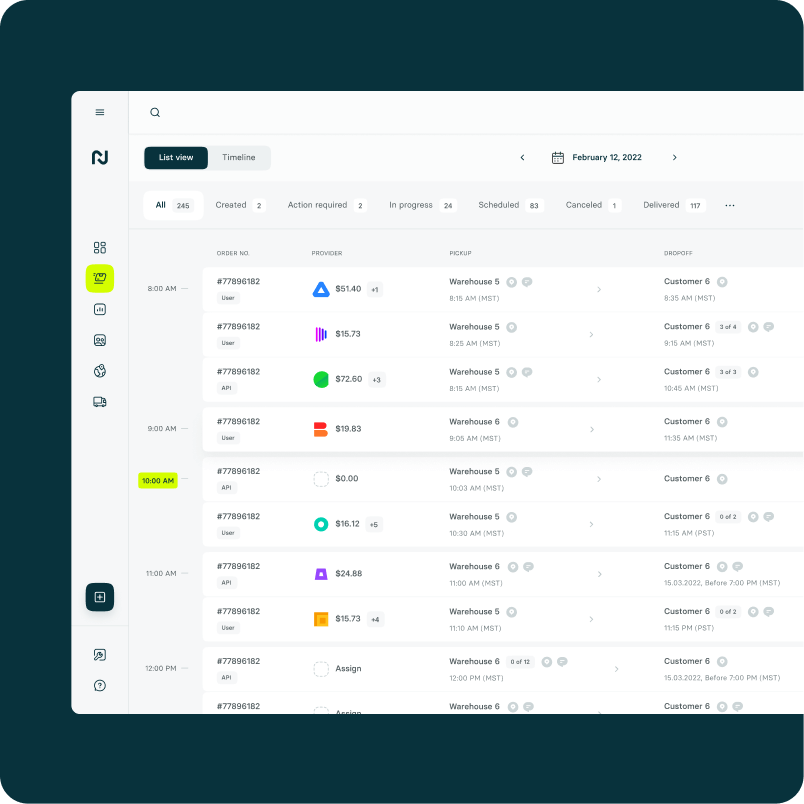
The Nash Portal provides scalable monitoring for thousands of concurrent jobs and is the recommended operational tool for live deliveries. For real-time, system-to-system updates, consume [webhooks](/reference/webhooks). When a delivery completes, proof of delivery may include photo confirmation, signature capture, or a barcode scan.

<img src="https://mintcdn.com/nashtechnologies/RFBLfoXweHrotTxu/images/concepts/nash-ui-3.png?fit=max&auto=format&n=RFBLfoXweHrotTxu&q=85&s=5387b941b83995afa8be4559732617ef" alt="Nash live operations" width="804" height="804" data-path="images/concepts/nash-ui-3.png" />

## The provider network

Nash connects you to **80+ delivery providers** through one integration — from national on-demand fleets like Uber, Roadie, and Instacart to specialty and regional couriers. You can also bring **your own fleet** and manage it alongside third-party providers in one place.

Because Nash competitively quotes across eligible providers and lets you negotiate contract pricing, you get coverage and price flexibility without integrating each provider yourself. You decide which providers are available to a given delivery through your [dispatch strategies](/reference/dispatch-strategies).

## Core building blocks

These are the primitives you work with when integrating Nash.

<CardGroup cols={2}>
  <Card title="Orders & Jobs" icon="box">
    An **order** captures a potential delivery and produces quotes. Once dispatched to a provider, it becomes a **job** (delivery) that you track to completion.
  </Card>

  <Card title="Dispatch Strategies" icon="route">
    Reusable configurations that decide which provider fulfills a delivery — by lowest price, a preferred order of providers, or reliability — with auto-dispatch, fee caps, and failover settings.
  </Card>

  <Card title="Workflows" icon="diagram-project">
    An automation engine that responds to events with filters and actions — applying a dispatch strategy, tagging or modifying orders, sending notifications, and more.
  </Card>

  <Card title="Webhooks" icon="bolt">
    Real-time event notifications (status updates, ETA changes, delays, proof of delivery) delivered to your endpoint so you can keep your systems and customers in sync.
  </Card>

  <Card title="Tracking" icon="location-dot">
    Live status and location for every delivery, available through the Portal, the API, and webhooks, with customizable tracking links for your end customers.
  </Card>

  <Card title="Routes & Optimization" icon="map">
    Group multiple orders into efficient, constraint-aware [routes](/reference/routes) for your own fleet, then dispatch them. See [Route Optimization](/guides/route-optimization).
  </Card>
</CardGroup>

### How orders flow into a strategy

Nash decides which dispatch strategy an order flows into automatically. See [Workflows](/reference/workflows) for how this decisioning is configured.

### Automatic failover

If a provider fails — a driver cancels, no driver accepts, or an SLA breach becomes likely — a dispatch strategy can be configured to reassign the delivery automatically: Nash detects the failure or risk, fetches fresh quotes from the remaining providers, dispatches to the next best option, and continues tracking. This behavior is controlled by your dispatch strategy settings.

## Where Nash Agent fits

Everything above runs on rules you configure. [Nash Agent](/nash-agent/overview) handles what rules can't: investigating a late delivery, recommending a strategy change, watching a risky order until it resolves. It acts with a confirmation step — scoped to your organization and your permissions.

<div className="nash-callout-signal">
  <svg viewBox="0 0 24 24" fill="none" stroke="currentColor" strokeWidth="1.7" strokeLinecap="square" strokeLinejoin="miter">
    <path d="m12 3 2 7 7 2-7 2-2 7-2-7-7-2 7-2z" />
  </svg>

  <div><strong>Nash intervened</strong> — the moment a recommendation becomes an action. The agent docs cover how to <a href="/nash-agent/guardrails">control exactly when that's allowed</a>.</div>
</div>

<CardGroup cols={2}>
  <Card title="Nash Agent overview" icon={<svg viewBox="0 0 24 24" width="20" height="20" fill="none" stroke="currentColor" strokeWidth="1.7" strokeLinecap="square" strokeLinejoin="miter"><path d="M5 9.7 19 7.7v9.6L5 19.3z" /><path d="M12 8.7V5.2l3.4-1.7" /><path d="M9.2 13.2v2M14.8 12.4v2" /></svg>} href="/nash-agent/overview">
    What the copilot can see, what it can do, and what it asks first.
  </Card>

  <Card title="Guardrails & confirmations" icon={<svg viewBox="0 0 24 24" width="20" height="20" fill="none" stroke="currentColor" strokeWidth="1.7" strokeLinecap="square" strokeLinejoin="miter"><path d="M12 3l7.5 2.8v6.6c0 4.2-3.2 6.9-7.5 8.6-4.3-1.7-7.5-4.4-7.5-8.6V5.8z" /></svg>} href="/nash-agent/guardrails">
    Which actions run automatically — and which wait for your sign-off.
  </Card>
</CardGroup>

## Why teams use Nash

The pattern across all of it: one integration, and the hard parts of delivery become configuration instead of code.

* **Coverage without integrations.** On-demand, scheduled, multi-stop, and batched deliveries across 80+ providers and your own fleet — managed in one place.
* **Cost under control.** Quotes are competitive by default; dispatch strategies pick by price, ETA, reliability, or your own blend, and Nash's volume helps on contract rates.
* **Speed you can see.** Real-time courier and ETA visibility, route optimization for your fleet, and automatic failover when a provider falls through.
* **Customers kept in the loop.** Live tracking pages and notifications that ride the same events your systems consume.

## Next steps

<CardGroup cols={2}>
  <Card title="Create an order" icon="box" href="/api-reference/order/create-order">
    Submit a delivery and retrieve provider quotes.
  </Card>

  <Card title="Dispatch strategies" icon="route" href="/reference/dispatch-strategies">
    Configure how Nash selects a provider for each delivery.
  </Card>

  <Card title="Webhooks" icon="bolt" href="/reference/webhooks">
    Receive real-time delivery events on your endpoint.
  </Card>

  <Card title="API overview" icon="code" href="/api-reference/api-overview">
    Explore the full API reference.
  </Card>
</CardGroup>
