> ## Documentation Index
> Fetch the complete documentation index at: https://docs.usenash.com/llms.txt
> Use this file to discover all available pages before exploring further.
# Background
> Overview of Pick and Pack across Orders, Product Catalog, and Store Inventory
Pick and Pack enables item-level fulfillment by coordinating products, store-level inventory, and delivery providers.
***
## Quick Start
Define your master product data with names, images, categories, and identifiers
Track per-store availability, pricing, and aisle locations for efficient picking
Handle substitutions, track picking status, and manage item-level fulfillment
***
## Product Catalog
Your product catalog serves as the master data source for all items across your stores. It defines the core product information that drives inventory management, order processing, and picking operations.
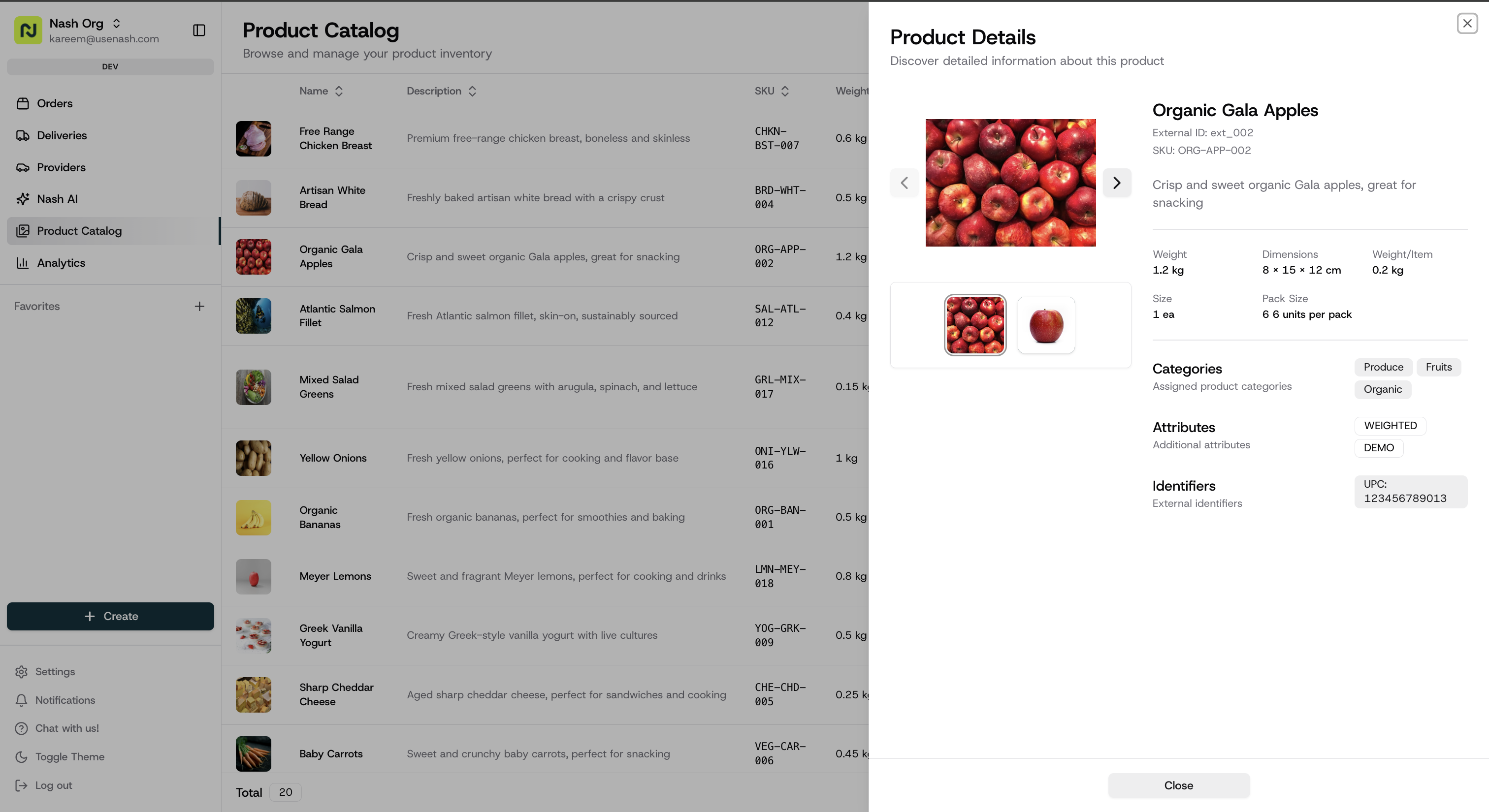 Products are managed in bulk and referenced throughout your fulfillment workflow by inventory and orders.
### Key fields
* **Required fields**: `name`, `imageUrls[]`, `categories[]`, `weight`, `dimensions{depth,height,width}`, `identifiers[{type,value}]`.
* **Optional fields**: `externalIdentifier`, `sku`, `description`, `attributes[]` (e.g., `WEIGHTED`), and `details` (`sizeSpecification`, `packSizeSpecification`, `weightedItemInfo`).
### Rate Limits
* **10 requests per second** per organization
* **1,000 products** per request
### API Endpoints
* **[Create/Update Products](/api-reference/store-catalog/create-or-update-products)**: `POST /v1/products` - Bulk create or update products
* **[List Products](/api-reference/store-catalog/get-products)**: `GET /v1/products` - Retrieve products with pagination
Ready-to-use sample payloads for common product types
***
## Store Inventory
Store inventory tracks the real-time availability, pricing, and location of products within each of your store locations. This data powers accurate order fulfillment by ensuring pickers know exactly what's available and where to find it.
Products are managed in bulk and referenced throughout your fulfillment workflow by inventory and orders.
### Key fields
* **Required fields**: `name`, `imageUrls[]`, `categories[]`, `weight`, `dimensions{depth,height,width}`, `identifiers[{type,value}]`.
* **Optional fields**: `externalIdentifier`, `sku`, `description`, `attributes[]` (e.g., `WEIGHTED`), and `details` (`sizeSpecification`, `packSizeSpecification`, `weightedItemInfo`).
### Rate Limits
* **10 requests per second** per organization
* **1,000 products** per request
### API Endpoints
* **[Create/Update Products](/api-reference/store-catalog/create-or-update-products)**: `POST /v1/products` - Bulk create or update products
* **[List Products](/api-reference/store-catalog/get-products)**: `GET /v1/products` - Retrieve products with pagination
Ready-to-use sample payloads for common product types
***
## Store Inventory
Store inventory tracks the real-time availability, pricing, and location of products within each of your store locations. This data powers accurate order fulfillment by ensuring pickers know exactly what's available and where to find it.
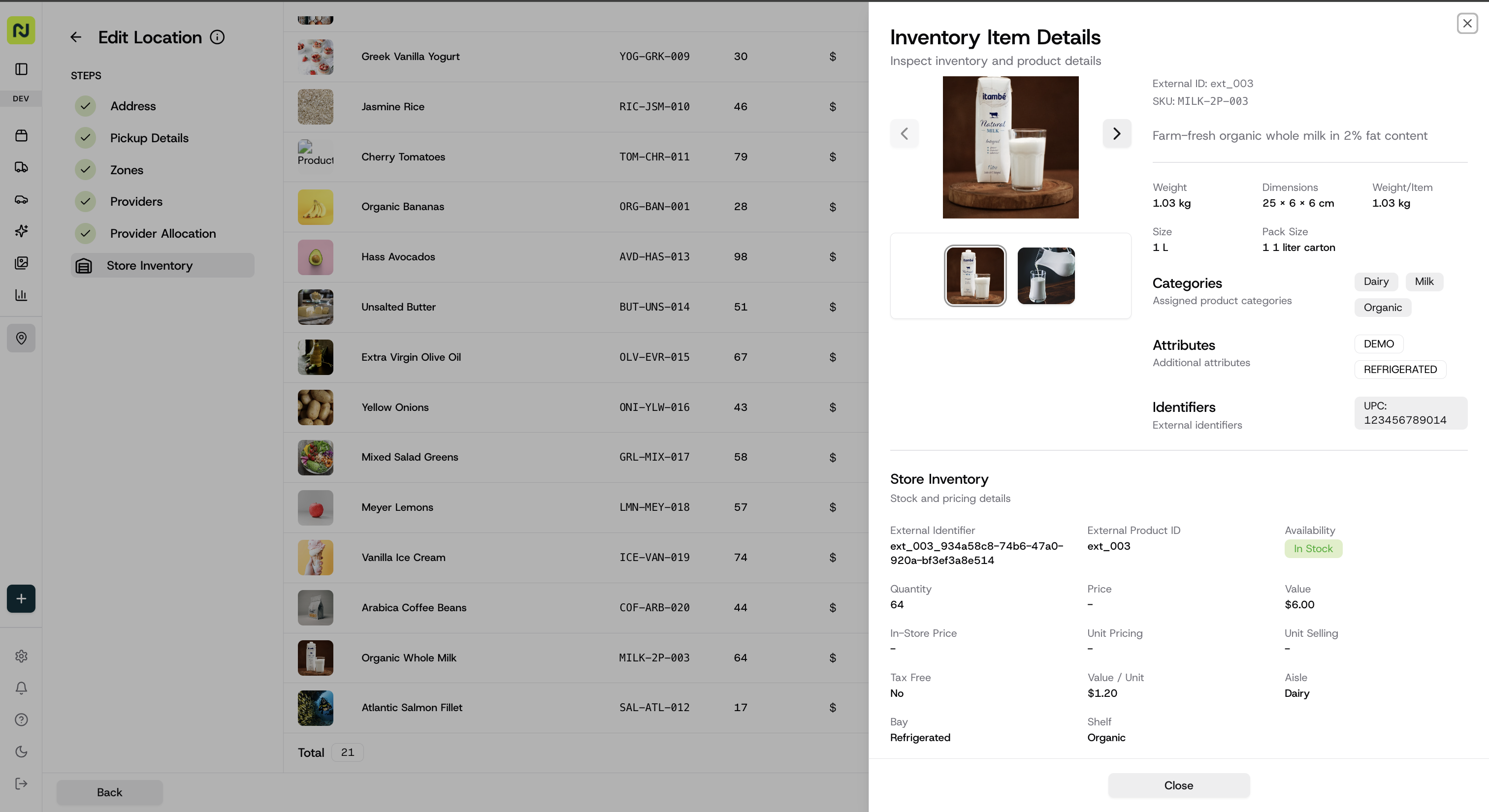 Each inventory entry links a product to a specific store location using your external identifiers, enabling precise per-store inventory management.
### Key fields
* **Required field**: `available` (boolean).
* **Common fields**: `externalProductId`, `externalStoreLocationId`, `quantity`, `valueCents`, `currency`, `location{aisle,bay,shelf}`.
### Weighted Items
For variable-weight products (produce, deli items, etc.):
1. Set the product attribute to `WEIGHTED` in your product catalog
2. Use `details.weightedItemInfo.valueCentsPerMeasurementUnit` for per-unit pricing (e.g., price per pound)
### Rate Limits
* **10 requests per second** per organization
* **10,000 inventory items** per request
### API Endpoints
* **[Create/Update Inventory](/api-reference/store-catalog/create-or-update-inventory)**: `POST /v1/inventory` - Bulk inventory updates
* **[Get Inventory](/api-reference/store-catalog/get-inventory)**: `GET /v1/inventory` - Query inventory with filters:
* `externalStoreLocationId`: Filter by store location
* `externalProductId`: Filter by product
* Pagination: `pageIndex`, `numResultsPerPage`
***
## Pick and Pack Orders
Orders with Pick and Pack enabled leverage your product catalog and store inventory to enable precise item-level fulfillment. The system tracks exactly what was requested, what was picked, and any substitutions made during the process.
To enable Pick and Pack functionality, include `pick_and_pack` in the `order.requirements` array when creating orders. See the complete list in [Order Requirements](/api-reference/order/order-requirements).
### Order Lifecycle
1. **Order Creation**: Customer places order with specific items with substitution preferences
2. **Picking**: 3rd party courier picks items, handling substitutions as needed
3. **Status Updates**: Real-time updates on picking progress
4. **Delivery**: Order handed off to delivery provider once picking is complete
### Sub-item fields
* **`item.subItems[].sku`**: optional SKU for the specific sub-item being picked.
* **`item.subItems[].substitution`**: object describing substitution preferences and chosen replacements.
* **`preference`**: e.g., `refund` or `substitute`.
* **`source`**: who made the decision (e.g., merchant, customer).
* **`substituteItems[]`**: list of `{ sku, quantity, weight }` representing the chosen replacements.
### Status
* **`items_pick_complete`**: emitted when item picking for the order has finished and it is ready for handoff to delivery. Track this status via your order retrieval endpoints and/or subscribe to status change events in [Webhooks](/reference/webhooks).
### Picked items
Each delivery carries a `picked_items` array describing what the picker actually put in the bag. The REST response always emits the same fields per item; values are nullable, but fields are never omitted.
| Field | Type | Notes |
| -------------------- | -------------- | ---------------------------------------------------------------------------------------------------------------------------------------------- |
| `id` | string \| null | Order line ID this pick fulfills. `null` when the SKU wasn't a pre-existing line (substitution). |
| `sku` | string | SKU of what was actually picked. |
| `name` | string | Display name of the picked item. |
| `status` | string | Fulfillment status (e.g. `no_substitution`, `pre_selected`, `override`). Opaque pass-through from the upstream provider. |
| `quantity` | int | Units picked. |
| `requested_quantity` | int \| null | Units originally requested. |
| `weight` | number \| null | Net weight in kilograms for random-weight goods. |
| `price_cents` | int | Line price in cents (already reflects `weight × unit price` for weighted items). |
| `requested_id` | string | ID of the original order line. |
| `requested_sku` | string | Originally requested SKU. Equals `sku` on straight picks. |
| `scanned_barcode` | string \| null | Raw scan at pick time. `null` for loose produce; 8/12/13 digits for EAN/UPC; ≥24 for GS1 in-store labels (GTIN + weight + price + use-by). |
| `scans` | array \| null | Per-scan detail for multi-scan items (e.g. a variable-weight item scanned multiple times). Each entry has its own parsed `barcodes[]` payload. |
A substitution is identifiable by `sku != requested_sku` (or equivalently, `id == null`).
#### Example — straight pick, packaged item
```json theme={null}
{
"id": "11111111-1111-1111-1111-111111111111",
"sku": "100001",
"name": "Dried Fruit Snack 130g",
"status": "no_substitution",
"quantity": 2,
"requested_quantity": 2,
"weight": null,
"price_cents": 880,
"requested_id": "11111111-1111-1111-1111-111111111111",
"requested_sku": "100001",
"scanned_barcode": "1234567890128",
"scans": null
}
```
#### Example — straight pick, weighted item (single scan)
`weight` is populated; `scanned_barcode` is a GS1 in-store label encoding GTIN + weight + price. `scans` is `null` because the item was captured in a single scan.
```json theme={null}
{
"id": "22222222-2222-2222-2222-222222222222",
"sku": "200002",
"name": "Free Range Chicken Tenderloins 450g-650g",
"status": "no_substitution",
"quantity": 1,
"requested_quantity": 1,
"weight": 0.608,
"price_cents": 1307,
"requested_id": "22222222-2222-2222-2222-222222222222",
"requested_sku": "200002",
"scanned_barcode": "0112345678901234152601013103000608392200130700",
"scans": null
}
```
#### Example — substitution
```json theme={null}
{
"id": null,
"sku": "300099",
"name": "Immune Support Shot 60ml",
"status": "pre_selected",
"quantity": 1,
"requested_quantity": 1,
"weight": null,
"price_cents": 330,
"requested_id": "33333333-3333-3333-3333-333333333333",
"requested_sku": "300003",
"scanned_barcode": "2345678901235",
"scans": null
}
```
#### Example — loose produce (no scan)
Items sold "each" have no physical barcode. Identify by `sku`.
```json theme={null}
{
"id": "66666666-6666-6666-6666-666666666666",
"sku": "600006",
"name": "Fresh Bananas Each",
"status": "no_substitution",
"quantity": 2,
"requested_quantity": 2,
"weight": null,
"price_cents": 186,
"requested_id": "66666666-6666-6666-6666-666666666666",
"requested_sku": "600006",
"scanned_barcode": null,
"scans": null
}
```
#### Example — weighted item with multiple scans
Variable-weight items picked across multiple physical units produce one `scans[]` entry per scan, each with a parsed GS1 payload. For richer parsed output, read `scans[].barcodes[]` instead of re-parsing `scanned_barcode` yourself.
```json theme={null}
{
"id": "77777777-7777-7777-7777-777777777777",
"sku": "700007",
"name": "Bananas Loose",
"status": "no_substitution",
"quantity": 1,
"requested_quantity": 1,
"weight": 1.45,
"price_cents": 450,
"requested_id": "77777777-7777-7777-7777-777777777777",
"requested_sku": "700007",
"scanned_barcode": "0112345678901234310300072039220000225",
"scans": [
{
"substitution_type": "no_substitution",
"barcodes": [
{
"barcode": "0112345678901234310300072039220000225",
"format": "gs1_databar",
"is_variable_weight": true,
"weight": 0.72,
"weight_unit": "kg",
"price_cents": 225,
"product_code": "12345678901234",
"expiration_date": null
}
]
},
{
"substitution_type": "no_substitution",
"barcodes": [
{
"barcode": "0112345678901234310300073039220000225",
"format": "gs1_databar",
"is_variable_weight": true,
"weight": 0.73,
"weight_unit": "kg",
"price_cents": 225,
"product_code": "12345678901234",
"expiration_date": null
}
]
}
]
}
```
Each inventory entry links a product to a specific store location using your external identifiers, enabling precise per-store inventory management.
### Key fields
* **Required field**: `available` (boolean).
* **Common fields**: `externalProductId`, `externalStoreLocationId`, `quantity`, `valueCents`, `currency`, `location{aisle,bay,shelf}`.
### Weighted Items
For variable-weight products (produce, deli items, etc.):
1. Set the product attribute to `WEIGHTED` in your product catalog
2. Use `details.weightedItemInfo.valueCentsPerMeasurementUnit` for per-unit pricing (e.g., price per pound)
### Rate Limits
* **10 requests per second** per organization
* **10,000 inventory items** per request
### API Endpoints
* **[Create/Update Inventory](/api-reference/store-catalog/create-or-update-inventory)**: `POST /v1/inventory` - Bulk inventory updates
* **[Get Inventory](/api-reference/store-catalog/get-inventory)**: `GET /v1/inventory` - Query inventory with filters:
* `externalStoreLocationId`: Filter by store location
* `externalProductId`: Filter by product
* Pagination: `pageIndex`, `numResultsPerPage`
***
## Pick and Pack Orders
Orders with Pick and Pack enabled leverage your product catalog and store inventory to enable precise item-level fulfillment. The system tracks exactly what was requested, what was picked, and any substitutions made during the process.
To enable Pick and Pack functionality, include `pick_and_pack` in the `order.requirements` array when creating orders. See the complete list in [Order Requirements](/api-reference/order/order-requirements).
### Order Lifecycle
1. **Order Creation**: Customer places order with specific items with substitution preferences
2. **Picking**: 3rd party courier picks items, handling substitutions as needed
3. **Status Updates**: Real-time updates on picking progress
4. **Delivery**: Order handed off to delivery provider once picking is complete
### Sub-item fields
* **`item.subItems[].sku`**: optional SKU for the specific sub-item being picked.
* **`item.subItems[].substitution`**: object describing substitution preferences and chosen replacements.
* **`preference`**: e.g., `refund` or `substitute`.
* **`source`**: who made the decision (e.g., merchant, customer).
* **`substituteItems[]`**: list of `{ sku, quantity, weight }` representing the chosen replacements.
### Status
* **`items_pick_complete`**: emitted when item picking for the order has finished and it is ready for handoff to delivery. Track this status via your order retrieval endpoints and/or subscribe to status change events in [Webhooks](/reference/webhooks).
### Picked items
Each delivery carries a `picked_items` array describing what the picker actually put in the bag. The REST response always emits the same fields per item; values are nullable, but fields are never omitted.
| Field | Type | Notes |
| -------------------- | -------------- | ---------------------------------------------------------------------------------------------------------------------------------------------- |
| `id` | string \| null | Order line ID this pick fulfills. `null` when the SKU wasn't a pre-existing line (substitution). |
| `sku` | string | SKU of what was actually picked. |
| `name` | string | Display name of the picked item. |
| `status` | string | Fulfillment status (e.g. `no_substitution`, `pre_selected`, `override`). Opaque pass-through from the upstream provider. |
| `quantity` | int | Units picked. |
| `requested_quantity` | int \| null | Units originally requested. |
| `weight` | number \| null | Net weight in kilograms for random-weight goods. |
| `price_cents` | int | Line price in cents (already reflects `weight × unit price` for weighted items). |
| `requested_id` | string | ID of the original order line. |
| `requested_sku` | string | Originally requested SKU. Equals `sku` on straight picks. |
| `scanned_barcode` | string \| null | Raw scan at pick time. `null` for loose produce; 8/12/13 digits for EAN/UPC; ≥24 for GS1 in-store labels (GTIN + weight + price + use-by). |
| `scans` | array \| null | Per-scan detail for multi-scan items (e.g. a variable-weight item scanned multiple times). Each entry has its own parsed `barcodes[]` payload. |
A substitution is identifiable by `sku != requested_sku` (or equivalently, `id == null`).
#### Example — straight pick, packaged item
```json theme={null}
{
"id": "11111111-1111-1111-1111-111111111111",
"sku": "100001",
"name": "Dried Fruit Snack 130g",
"status": "no_substitution",
"quantity": 2,
"requested_quantity": 2,
"weight": null,
"price_cents": 880,
"requested_id": "11111111-1111-1111-1111-111111111111",
"requested_sku": "100001",
"scanned_barcode": "1234567890128",
"scans": null
}
```
#### Example — straight pick, weighted item (single scan)
`weight` is populated; `scanned_barcode` is a GS1 in-store label encoding GTIN + weight + price. `scans` is `null` because the item was captured in a single scan.
```json theme={null}
{
"id": "22222222-2222-2222-2222-222222222222",
"sku": "200002",
"name": "Free Range Chicken Tenderloins 450g-650g",
"status": "no_substitution",
"quantity": 1,
"requested_quantity": 1,
"weight": 0.608,
"price_cents": 1307,
"requested_id": "22222222-2222-2222-2222-222222222222",
"requested_sku": "200002",
"scanned_barcode": "0112345678901234152601013103000608392200130700",
"scans": null
}
```
#### Example — substitution
```json theme={null}
{
"id": null,
"sku": "300099",
"name": "Immune Support Shot 60ml",
"status": "pre_selected",
"quantity": 1,
"requested_quantity": 1,
"weight": null,
"price_cents": 330,
"requested_id": "33333333-3333-3333-3333-333333333333",
"requested_sku": "300003",
"scanned_barcode": "2345678901235",
"scans": null
}
```
#### Example — loose produce (no scan)
Items sold "each" have no physical barcode. Identify by `sku`.
```json theme={null}
{
"id": "66666666-6666-6666-6666-666666666666",
"sku": "600006",
"name": "Fresh Bananas Each",
"status": "no_substitution",
"quantity": 2,
"requested_quantity": 2,
"weight": null,
"price_cents": 186,
"requested_id": "66666666-6666-6666-6666-666666666666",
"requested_sku": "600006",
"scanned_barcode": null,
"scans": null
}
```
#### Example — weighted item with multiple scans
Variable-weight items picked across multiple physical units produce one `scans[]` entry per scan, each with a parsed GS1 payload. For richer parsed output, read `scans[].barcodes[]` instead of re-parsing `scanned_barcode` yourself.
```json theme={null}
{
"id": "77777777-7777-7777-7777-777777777777",
"sku": "700007",
"name": "Bananas Loose",
"status": "no_substitution",
"quantity": 1,
"requested_quantity": 1,
"weight": 1.45,
"price_cents": 450,
"requested_id": "77777777-7777-7777-7777-777777777777",
"requested_sku": "700007",
"scanned_barcode": "0112345678901234310300072039220000225",
"scans": [
{
"substitution_type": "no_substitution",
"barcodes": [
{
"barcode": "0112345678901234310300072039220000225",
"format": "gs1_databar",
"is_variable_weight": true,
"weight": 0.72,
"weight_unit": "kg",
"price_cents": 225,
"product_code": "12345678901234",
"expiration_date": null
}
]
},
{
"substitution_type": "no_substitution",
"barcodes": [
{
"barcode": "0112345678901234310300073039220000225",
"format": "gs1_databar",
"is_variable_weight": true,
"weight": 0.73,
"weight_unit": "kg",
"price_cents": 225,
"product_code": "12345678901234",
"expiration_date": null
}
]
}
]
}
```